The MIO Workbench is an Open Source Eclipse-based verification tool and editor for modal I/O automata (MIOs), which are used for formally specifying the behaviour of software components or services.
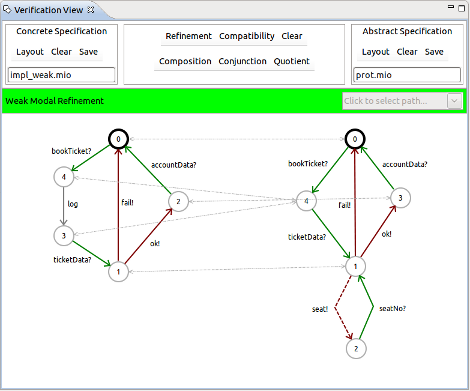
Besides a graphical editor allowing to create new or change existing MIOs, the following verification tools are implemented:
- Re finement Operations. These include Strong Re finement, May-Weak Refinement, Weak Re finement, and Strict-Observational Refinement.
- Compatibility Operations. We support the notions of Strong Compatibility, “Helpful Environment” Compatibility, Weak Compatibility, and Strict-Observational Refinement.
- Composition Operations on MIOs, including pessimistic and optimistic composition.
- Conjunction and quotient operators.
The MIO Workbench is able to display refinement relations and compatible states in a side-by side view; also, problems encountered during a search for refinement or compatibility are indicated via paths on the graphical level.
To use the MIO Workbench, point your Eclipse installation to our update site. More information on Downloads.
Technologies In Use
The MIO Workbench makes use of a number of technologies from the Eclipse project.
- The Workbench itself is based on Eclipse and OSGi. It includes extension points for adding new refinement, compatibility, and composition operations without touching the workbench code.
- The underlying MIO model is based on the Eclipse Modeling Framework (EMF), and thus can be serialized to and read from different formats.
- The graphical editor and view are based on the Standard Widget Toolkit (SWT) and the Draw2D framework.
For more information on Eclipse technologies, please visit www.eclipse.org.
Comments are closed.